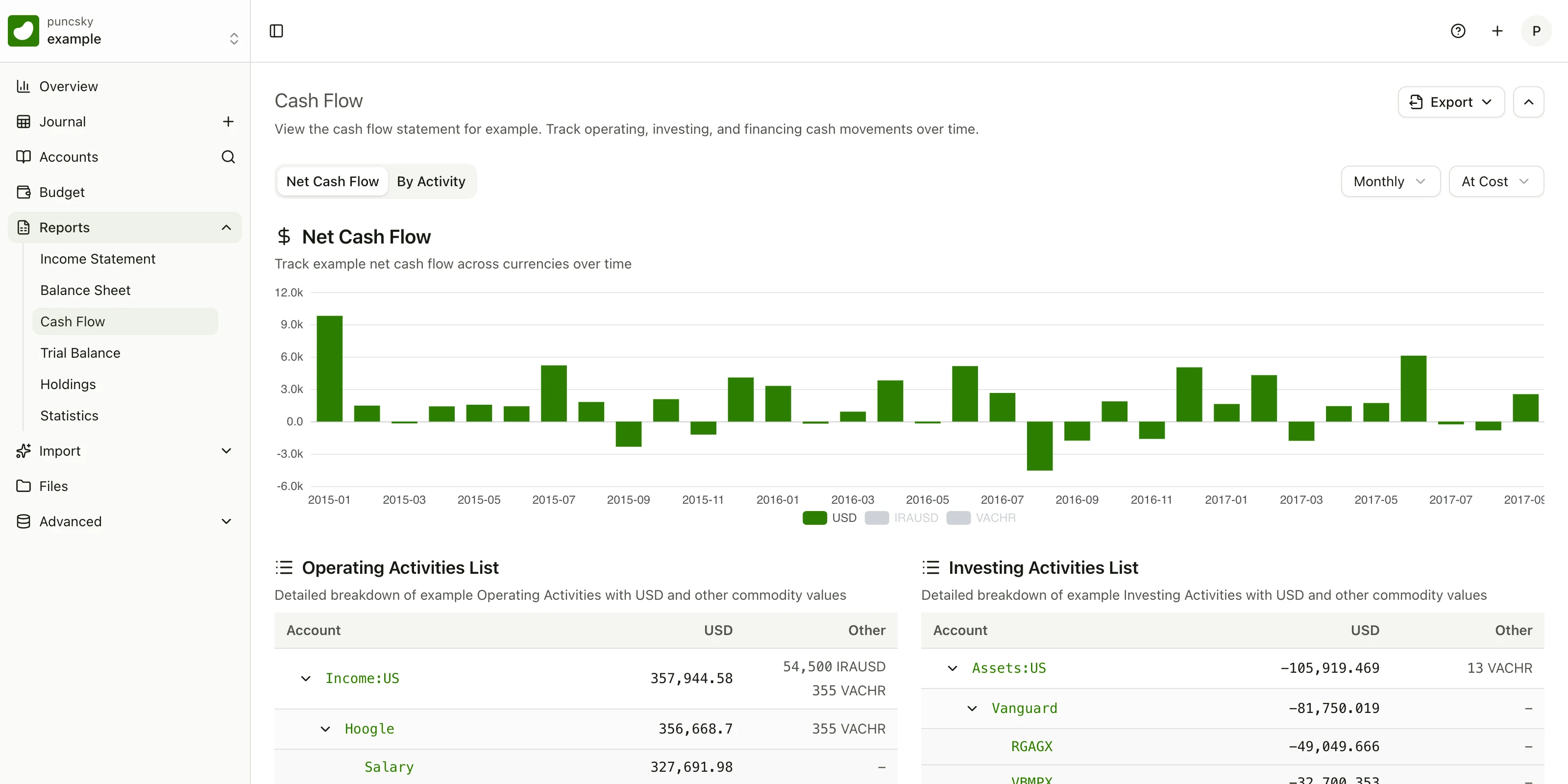
Every cash-flow statement rests on a quiet decision made once per account: is this account part of the cash you are explaining, or is it an operating, investing, or financing activity? Get that decision right and the statement tells you where your money actually went. Get it wrong and the statement is confidently misleading.
Until now, the Beancount.io cash-flow report made that decision for you with heuristics — the account's root type, plus a name-based guess at which assets count as cash. For most ledgers the guess was right most of the time, and silently wrong the rest of the time. A brokerage account named the wrong way landed in the wrong section. A money-market fund that is cash in every practical sense sat in Investing Activities because its name didn't say so.
Starting today, you can make the classification explicit. One line of standard beancount metadata on the account's open directive:
2000-01-01 open Assets:US:Brokerage
  cash-flow-role: "investing"

2000-01-01 open Assets:US:Marcus:Savings
  cash-flow-role: "cash"
One key, four values — cash, operating, investing, financing — and that is the entire configuration. There is no settings page, no JSON file, no per-report options dialog. The next time the cash-flow report loads, the brokerage account's flows appear under Investing Activities, the savings account joins the cash pile whose change the statement explains, and every other account keeps working exactly as before.
What each role means
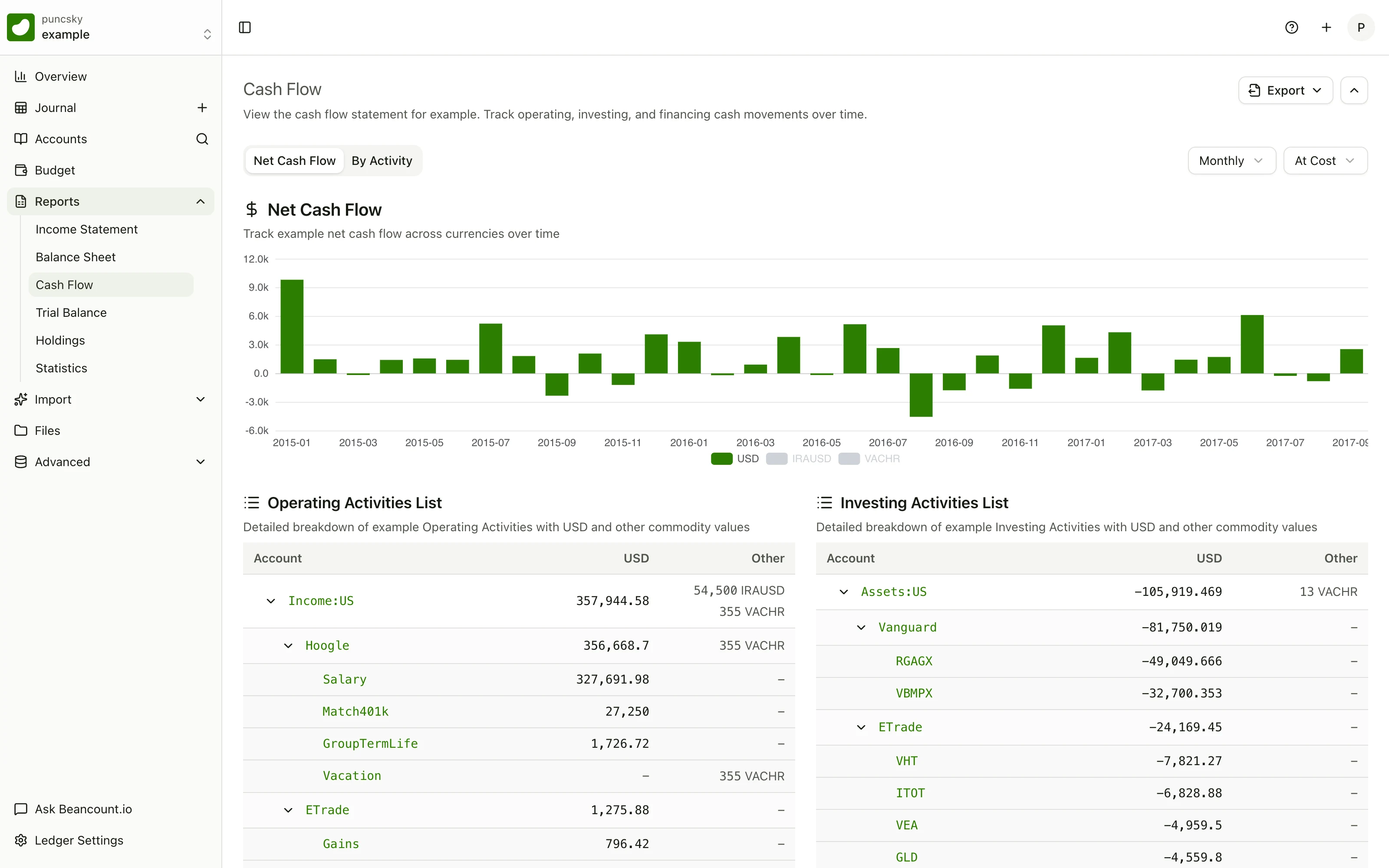
A cash-flow statement sorts every account into one of two jobs, and cash-flow-role answers both with a single word:
"cash"— the account belongs to the cash-and-equivalents pile. Cash accounts never appear as line items; the statement explains the change in their combined balance, and transfers between two cash accounts cancel out, the way moving money from checking to savings should."operating"/"investing"/"financing"— the account is not cash, and its period change appears as a line under that activity section.
By default, the report treats asset accounts whose names contain Cash, Checking, Savings, or Bank as cash equivalents. Declaring a role overrides that in both directions. cash-flow-role: "cash" pulls in an account the name rule misses — a money-market fund, a stablecoin wallet. And cash-flow-role: "investing" on Assets:US:Bank:CD does two things with one line: it excludes the CD from cash and files it under investing, even though its name would have matched the cash rule.
We deliberately used one key instead of two. "Is this account cash?" and "which activity section does it belong to?" were never independent questions — an account is either part of the cash pile or it belongs to exactly one activity section. Two keys would have allowed nonsense states, like a cash account with an activity role. One key makes the illegal states unrepresentable, and the whole specification fits in a tweet.
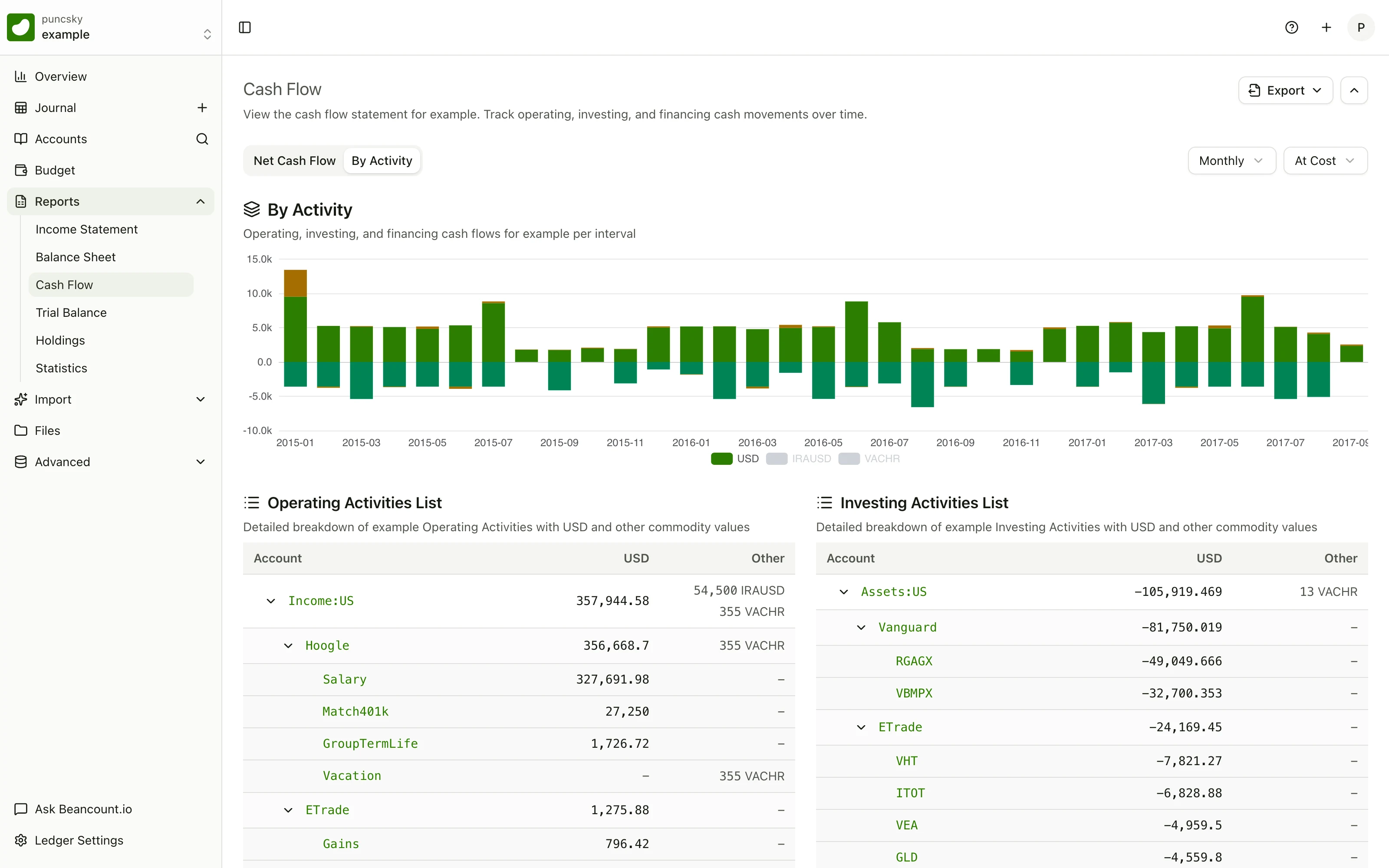
The classification you declare is the classification every view uses. The By Activity chart stacks each month's operating, investing, and financing flows; move an account's role, and its flows move to the right layer of the chart, the right section of the statement, and the right line of the export, all at once.
Declared beats inferred — and the report shows its work
Classification now resolves in a strict order: your metadata first, the built-in heuristic second. And the report is honest about what it did. The statement ends with a "Cash & cash equivalents in this report" panel listing exactly which accounts it treated as cash when building the numbers, then reconciles them: cash at period start, cash at period end, and the net change the activity sections explain.
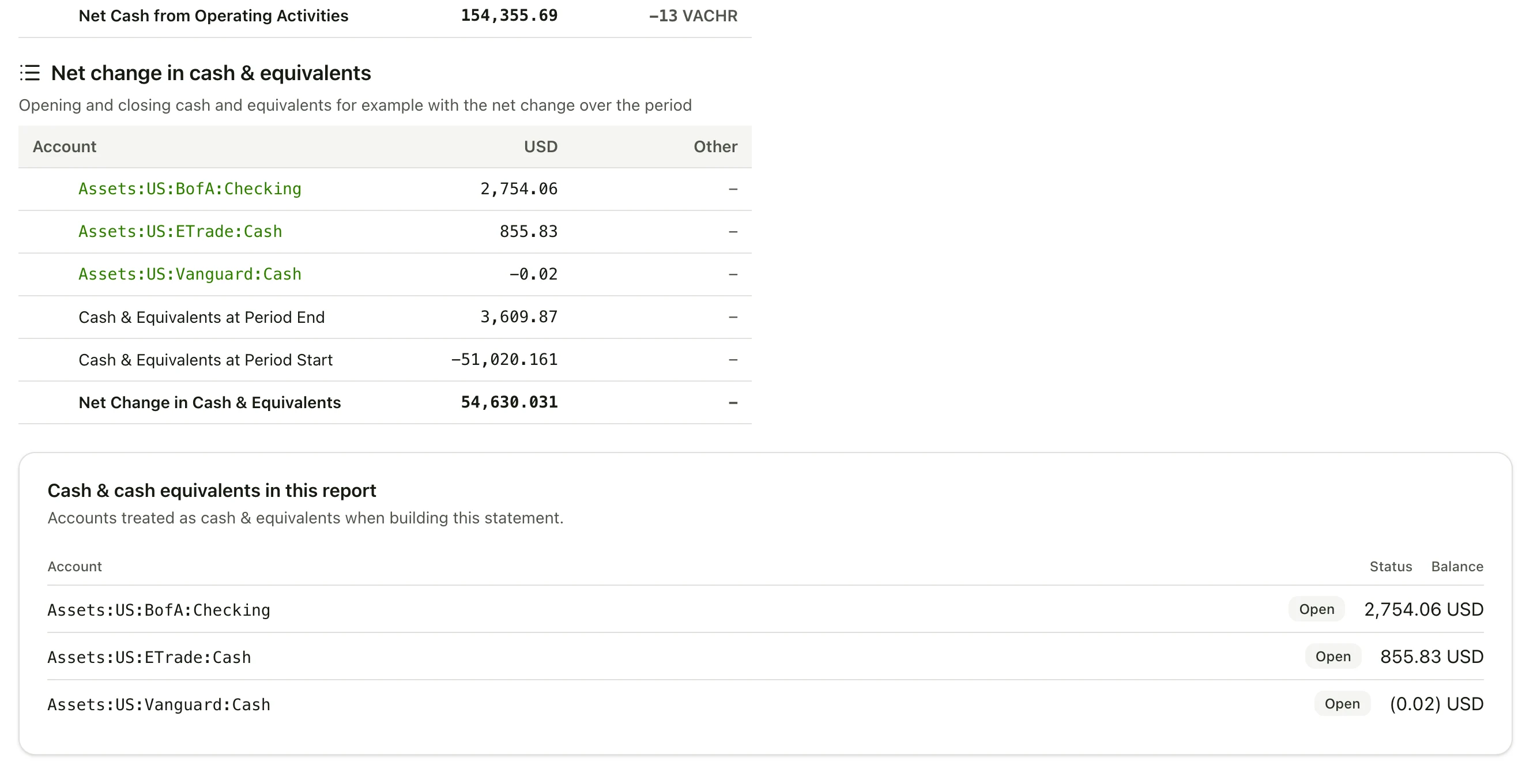
The report also distinguishes classifications you declared from classifications it inferred, and the distinction carries into CSV and Markdown exports: a statement built entirely from declared roles no longer carries the "classification is inferred" disclosure line, because at that point the classification is not an inference — it is part of your books.
Typos are handled the way a plain-text tool should handle them. cash-flow-role: "invsting" is not silently accepted and not silently ignored: the account falls back to the default heuristic, and the status panel flags it — "unknown cash-flow-role value, using default" — so the mistake is visible where you look, not buried in a log.
If you change nothing, nothing changes
Unannotated accounts use the same published defaults as before: Income and Expenses map to operating, non-cash Assets to investing, Liabilities and Equity to financing, and name-matched cash equivalents form the cash pile. An existing ledger renders identically before and after this release. Most users will annotate a handful of accounts — the ones where the default is wrong — and never think about the rest.
Portability is untouched, too. Metadata on open directives is core beancount syntax, parsed by every v2/v3 tool and ignored by anything that doesn't look for this specific key. bean-check passes, Fava shrugs, and your ledger remains fully usable outside Beancount.io.
Every view of your cash agrees with every other
One shared resolver produces the final role for each account, and every consumer reads from it:
- The cash-flow report builds its activity sections and its bottom line — net change in cash and equivalents — from the resolved roles.
- CSV, Markdown, and print exports carry the same numbers, with the inferred-classification disclosure only where a heuristic was actually used.
- The overview Sankey diagram reads the same declarations, so an account you marked as cash stops appearing as a flow node, and your declared activity roles are honored for non-Income accounts.
- The account-status panel stops listing a declared account as an "unclassified asset."
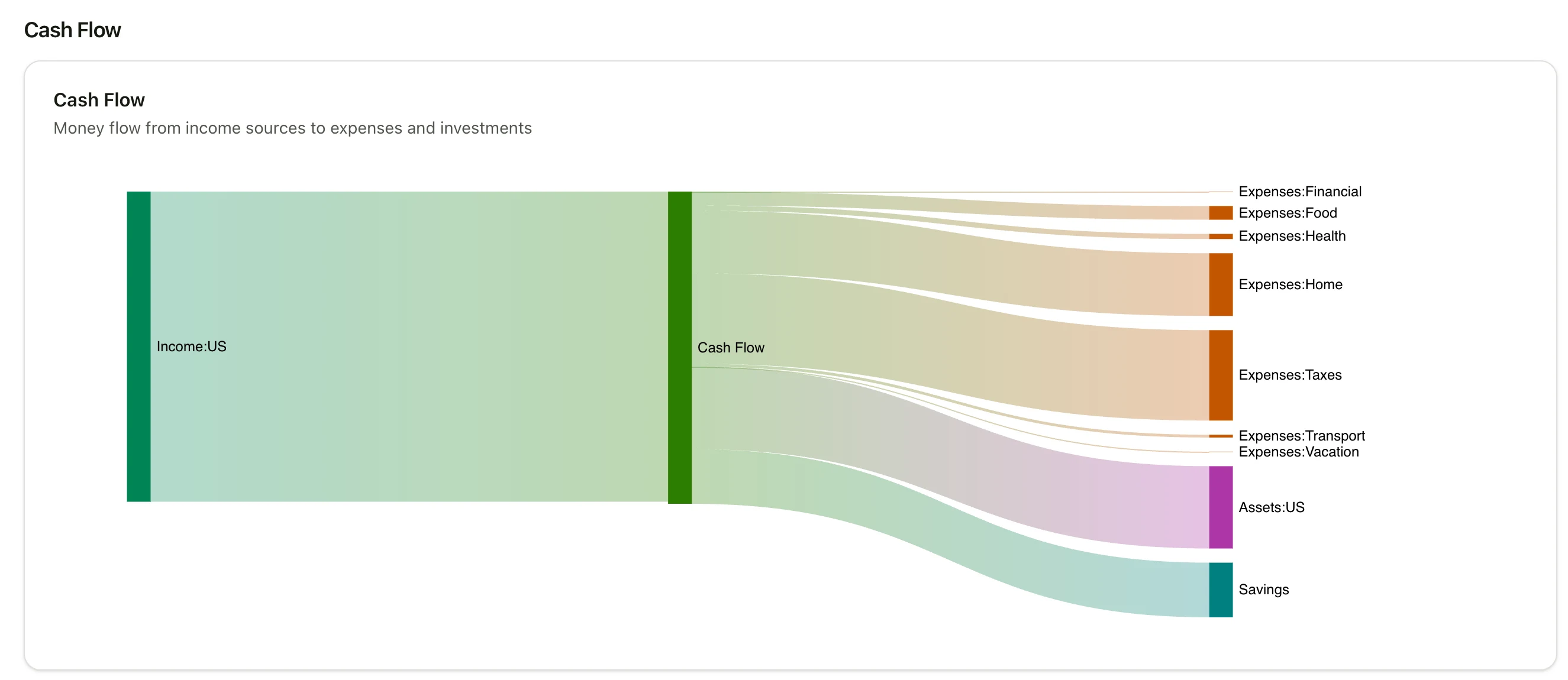
There is no way for the statement and the diagram to disagree about what your cash is, because there is only one answer to disagree about.
Why the ledger, and not a settings page
This is the part of the release we feel strongest about. We considered a settings UI and rejected it, for three reasons:
- The ledger is the source of truth. A classification that lives anywhere else can disagree with the books it describes. A classification that lives on the
opendirective travels with the account — through renames, through repository moves, through every client that reads the file. - Plain text is diffable, greppable, and reviewable. If you keep your ledger in git — and if you use Beancount.io, you do — the classification rule is now something you can
grep,diff, andblame, and something a reviewer can see in a pull request. A settings page is none of those things. - It works offline and everywhere. Any editor can declare a role. Any future client that reads the ledger gets the classification for free, with zero per-client settings to sync.
For the same reason, classifications are deliberately not date-effective. The metadata describes the account's nature, which rarely changes; when it does, you edit the open directive, and your git history records what changed and when. That history is the audit trail.
Try it on your ledger
The feature is rolling out to all ledgers now. Declaring a role requires only a text editor:
- Open the file where the account's
opendirective lives. - Add
cash-flow-role: "cash"(or"operating","investing","financing") as an indented metadata line under it. - Reload the cash-flow report. Your declaration wins over the heuristic immediately.
Start with the accounts where the default guess is wrong — the CD that isn't really cash, the money-market fund that really is, the brokerage account you want cleanly under Investing Activities. Leave the rest alone. The full specification — accepted values, precedence, default classifications, and how invalid values are handled — lives in the Cash-Flow Roles reference.
Your books already knew which accounts are investments and which are daily spending. Now the cash-flow statement knows too.